Introduction
Sketching has always been the gateway into art. Long before finished paintings or detailed illustrations, artists begin with loose lines and rough ideas. Today, however, you no longer need paper, pencils, erasers, or expensive software to get started. You can sketch drawing online free, directly in your browser, using simple digital tools that feel intuitive and familiar.
If you are a complete beginner, a student, or someone who simply wants to draw for fun, this guide will walk you through everything you need to know. With FreeOnlinePaint.com, you can start sketching instantly—no downloads, no sign-ups, and no complicated setup. Just open the site and draw.
This guide is designed to stay simple, friendly, and stress-free—exactly how sketching should feel.
What Is Sketch Drawing vs. Regular Drawing?
Sketch drawing is often described as "thinking with lines." It is loose, exploratory, and forgiving. Sketches are not meant to be perfect; they are meant to help you understand shapes, proportions, and ideas.
Regular drawing, by contrast, is more refined and deliberate. It focuses on clarity, detail, and presentation.
What Is Sketch Drawing?
Sketch Drawing Focuses On:
- Basic shapes
- Rough, light lines
- Structure and movement
- Experimentation and exploration
When sketching, you are not trying to impress anyone. You are simply learning and observing.
What Is Regular Drawing?
Regular Drawing Usually Includes:
- Clean, confident outlines
- Shading, lighting, and color
- Fine details and textures
- A polished, finished look
Key Differences Between Sketch Drawing and Regular Drawing
For beginners, sketching is the ideal place to start. With digital art sketch drawing for beginners, mistakes are no longer permanent. You can erase, undo, zoom in, and try again without frustration. That is why using a free online paint tool for beginners makes learning to draw far more approachable and enjoyable.
Why Beginners Should Start with Sketch Drawing
Sketching builds foundational skills without pressure. It teaches observation, hand-eye coordination, and creative thinking—all essential for any artist.
Why Sketch Drawing Online Is Perfect for Beginners
Sketching online removes many of the traditional barriers that prevent people from starting art. There is no need to buy supplies, set up a workspace, or worry about wasting paper.
With a browser-based paint tool for sketch drawing, you can:
- Draw anywhere with an internet connection
- Practice whenever you have a few spare minutes
- Learn at your own pace, without pressure
No Supplies or Setup Required
Platforms like FreeOnlinePaint.com are designed to feel familiar, especially for users who have experience with MS Paint. This familiarity builds confidence. Instead of struggling to learn complex software, you can focus entirely on drawing.
Learn at Your Own Pace
Because it is a no installation required online drawing app, you also save storage space and time. You simply open your browser and begin sketching immediately.
Familiar MS Paint–Style Experience
The interface mimics classic drawing programs, making it intuitive for anyone who has used basic computer drawing tools.
No Installation Required
Access your sketch tools instantly without downloading or installing anything on your device.
Tools Needed to Sketch the Drawing Online
One of the greatest advantages of sketching—especially digital sketching—is its simplicity. You do not need dozens of tools or advanced features to improve.
Essential Sketch Tools
When using a paint app for sketching and simple digital art, the core tools you will rely on are:
- Pencil or brush tool
- Eraser
- Undo button
- Blank canvas
That is all you truly need.
The clean paint brush interface on FreeOnlinePaint.com keeps distractions to a minimum. It closely resembles the experience of drawing by computer in classic Microsoft Paint, which many users already understand.
Optional but Helpful Tools
As you gain confidence, you may find these tools useful:
- Line thickness control for lighter or bolder strokes
- Zoom tool for refining small areas
- Color picker for basic shading or emphasis
However, do not feel rushed to use everything. Sketching is about comfort and observation, not mastering every feature at once.
Why Simple Tools Are Best for Beginners
Simple tools help you focus on fundamentals rather than getting overwhelmed by features. This accelerates learning and builds confidence.
How to Sketch Drawing Online Free (Step-by-Step)
Let's walk through a beginner-friendly process using a draw online for free using browser-based paint tool approach.
Step 1: Open the Canvas
Visit FreeOnlinePaint.com. The canvas loads instantly—no registration, no waiting.
This digital canvas is your personal space to experiment, explore, and learn without judgment.
Step 2: Choose a Simple Brush
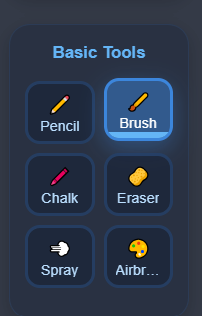
Select a thin brush or pencil tool. Thin lines are easier to erase and adjust, which is ideal for sketching.
This setup feels very similar to draw in MS Paint style online, making it comfortable for beginners.
Step 3: Sketch Basic Shapes
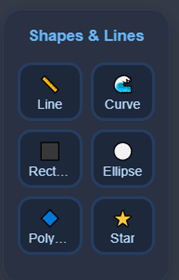
Avoid details at first. Use circles, rectangles, and simple lines to block out your subject.
This step is the foundation of learning how to sketch drawing online free without installation. You are training your eye to see structure rather than detail.
Step 4: Refine the Lines
Once the basic shapes feel right, lightly redraw over them. Clarify the form while keeping the lines loose and flexible.
Remember: refinement does not mean perfection.
Step 5: Save or Continue Practicing
You can save your sketch or continue experimenting. Improvement comes from repetition, not pressure. Even a few minutes of sketching daily can make a noticeable difference.
Common Sketching Mistakes to Avoid
Trying to Be Perfect Too Soon
Sketching is intentionally rough. If you focus on perfect lines from the beginning, you may feel frustrated or stuck. Allow your sketches to be messy.
Using Too Many Tools
Beginners often jump between tools unnecessarily. Stick to the basics. A pencil, eraser, and undo button are more than enough.
Inconsistent Practice
Sketching once a month will not build confidence. Short, daily practice sessions are progressive. Even ten minutes a day helps.
Using an online drawing app similar to Paint 3D makes quick, casual practice easy.
Why FreeOnlinePaint.com Is Ideal for Sketch Drawing
FreeOnlinePaint.com is designed with simplicity and accessibility in mind.
It offers:
- Easy drawing tools for beginners and students
- Free paint software online for casual users
- A familiar MS Paint–style sketch drawing by computer experience
Beginner-Friendly Interface
You can draw pictures online for free, practice shapes, sketch ideas, or simply relax and doodle. There is no pressure to create "serious art." The goal is enjoyment and gradual improvement.
Free and Accessible
Completely free with no hidden costs or premium features locked behind paywalls.
Perfect for Casual and Learning Use
Ideal for quick practice sessions, learning fundamentals, or casual creative expression.
Simple Daily Sketching Exercises for Beginners
One of the best ways to improve your sketching skills is through small, consistent exercises. You do not need long sessions or complex subjects. Simple daily practice builds confidence, muscle memory, and observation skills over time.
Here are a few beginner-friendly sketching exercises you can do online using FreeOnlinePaint.com.
1. Shape Practice (5–10 Minutes)
Start by filling your canvas with basic shapes:
- Circles
- Squares
- Rectangles
- Triangles
Focus on drawing them lightly and confidently. This exercise trains hand control and prepares you for more complex drawings.
2. Line Control Exercises
Draw straight lines across the canvas:
- Horizontal
- Vertical
- Diagonal
- Curved
Try to draw each line in one go. Avoid sketching slowly or correcting mid-line. This helps improve confidence and fluidity.
3. Object Breakdown Sketching
Pick a simple object around you, such as:
- A cup
- A book
- A phone
- A chair
Break the object down into basic shapes before adding any details. This reinforces the habit of seeing structure instead of surface details.
4. Timed Sketches
Set a timer for 2–5 minutes and sketch a simple subject. When time is up, stop—even if the sketch is unfinished.
Timed sketching:
- Reduces perfectionism
- Encourages faster observation
- Builds confidence
5. Redrawing the Same Sketch
Sketch the same object two or three times in a row. Each attempt will feel easier and more accurate. This repetition is one of the fastest ways to improve.
Because FreeOnlinePaint.com is a browser-based paint tool for sketch drawing, these exercises are easy to fit into your daily routine—no setup, no cleanup, and no pressure.
Best Sketching Tips to Improve Faster (Beginner-Friendly)
Sketching improves quickly when you focus on the right habits rather than talent or expensive tools. This section adds practical value for beginners who want noticeable progress while using sketch drawing online free tools.
Draw Light, Not Hard
Keep your lines soft and loose. Light strokes are easier to erase and adjust, especially when practicing online sketch drawing for beginners. Confidence comes from repetition, not pressure.
Focus on Observation Over Details
Spend more time observing your subject than drawing it. When using a digital sketch drawing tool, train your eyes to notice proportions, angles, and relationships instead of jumping into details too early.
Use Reference Images
Using references is not cheating. Reference images help beginners understand structure and improve accuracy when practicing digital art sketch drawing online.
Start with Bigger Shapes
Always start with large shapes before moving to smaller ones. This habit builds strong foundations and prevents distorted drawings, especially when learning sketch drawing online free.
Accept Imperfection
Not every sketch needs to be saved or shared. Some sketches exist only for learning. Let mistakes happen—this mindset is essential for growth.
Conclusion
Sketching is not about talent—it is about starting.
With tools like FreeOnlinePaint.com, anyone can explore drawing in a safe, pressure-free environment. Whether you are a student, a beginner, or simply curious, sketching online provides a quiet space to learn, experiment, and grow.
Open the canvas.
Draw a line.
Then draw another.
That is how every artist begins.
Frequently Asked Questions (FAQs)
-
What does sketch drawing online free actually mean?
Sketch drawing online free refers to creating rough drawings or practice sketches directly in your web browser without paying for software or installing programs. You use a free online drawing tool like FreeOnlinePaint.com that provides basic features such as a pencil, brush, eraser, and canvas. This allows beginners and casual users to sketch digitally with zero cost and zero setup. -
Is online sketch drawing for beginners effective?
Yes, online sketch drawing for beginners is highly effective because it removes pressure and fear of mistakes. Digital tools allow unlimited undo actions, easy erasing, and quick retries. Beginners can focus on learning basic shapes, line control, and proportions instead of worrying about wasting paper or supplies. -
How is digital sketch drawing different from traditional paper
sketching?
Digital sketch drawing offers flexibility that paper cannot. You can undo mistakes, resize the canvas, zoom in for details, and save multiple versions of your work. While traditional sketching builds tactile control, online sketching tools are more forgiving and ideal for early learning stages. -
Do I need a tablet to sketch drawing online free?
No, you do not need a tablet to sketch drawing online free. You can use a mouse, trackpad, or touchscreen device. While a tablet and stylus can feel more natural, beginners can easily learn digital art sketch drawing using simple input devices. -
What should beginners draw when practicing online sketch
drawing?
Beginners should start with simple objects and basic shapes. Items like cups, books, fruits, and furniture are ideal. The goal of online sketch drawing for beginners is understanding form and structure, not creating perfect artwork. -
Is FreeOnlinePaint.com good for digital art sketch drawing for
beginners?
Yes, FreeOnlinePaint.com is excellent for digital art sketch drawing for beginners. Its interface is clean, simple, and similar to MS Paint style drawing online, making it easy to learn without feeling overwhelmed by advanced features. -
Can students use free online paint tools for school work?
Absolutely. Free online paint tools are useful for students who need to practice drawing, sketch diagrams, or visualize ideas. Because they are browser-based, students can use them on school or home computers without installing software. -
How often should I practice sketch drawing online as a
beginner?
For best results, beginners should practice sketch drawing online for 10–20 minutes daily. Consistent short sessions improve hand control and observation faster than long, irregular practice. A browser-based drawing app makes daily practice convenient. -
Are online sketching tools only for casual users?
No. While online sketching tools are beginner-friendly, even experienced artists use them for warm-up sketches, rough concepts, and idea exploration. Simplicity can be powerful, especially during early creative stages. -
Can I save my work when using a draw online free tool?
Yes, most draw online free tools allow you to save your sketches. Saving your work helps track progress, review mistakes, and reuse sketches later for more detailed drawings or digital art projects. -
Does online sketch drawing help improve traditional drawing
skills?
Yes, online sketch drawing strengthens fundamentals such as proportion, structure, and observation. These skills directly transfer to traditional pencil-and-paper drawing, making digital practice a valuable learning method. -
Is it safe to use a no installation required online drawing
app?
Yes, a no installation required online drawing app is generally safe because it runs entirely in your browser. There are no downloads, no accounts, and minimal risk. Just remember to save your work before closing the browser. -
How does digital sketching help overcome fear of
mistakes?
Digital sketching removes fear by allowing unlimited corrections. Beginners feel more confident experimenting because mistakes can be erased instantly. -
Can online drawing and sketching be used for relaxation?
Yes, online drawing and sketching is often used as a stress-relief activity. Casual sketching helps relax the mind, improve focus, and express creativity without expectations or pressure. -
When should beginners move from free online sketch tools to
advanced software?
Beginners should move on only after mastering basic skills with free online sketch tools. Once you feel comfortable with shapes, proportions, and simple shading, transitioning to advanced digital art software becomes much easier and less intimidating.
Current Blogs
Upcoming Related Blogs
- Digital Sketching Mastery: Advanced techniques for online drawing
- Free Drawing Tools Comparison: Which browser-based app is best for you?
- From Sketch to Final Art: Turning rough sketches into finished pieces
- Digital Art for Complete Beginners: Your first month learning plan
- Tablet vs Mouse Drawing: Which is better for beginners?
- Color Theory for Digital Artists: Beginner's guide to using color
- Building a Digital Art Portfolio: Showcasing your online sketches